Skip to content
tegolySIGN
tegoly Support German
View Categories
  • Home
  • Docs
  • DATEV users

tegolySIGN Connector – Configuring DATEV Status

With the status in DATEV DMS, you can assign a corresponding status to documents, e.g. to filter or search for them. This makes it easier to find it and you keep track of the current state of the document.

To do this, you first have to create the status in DATEV, then you can select it in our connector.

The important thing when creating the status is to always check all document classes.
You can find more information on how to create the status here: Creating a document status – DATEV Help Center

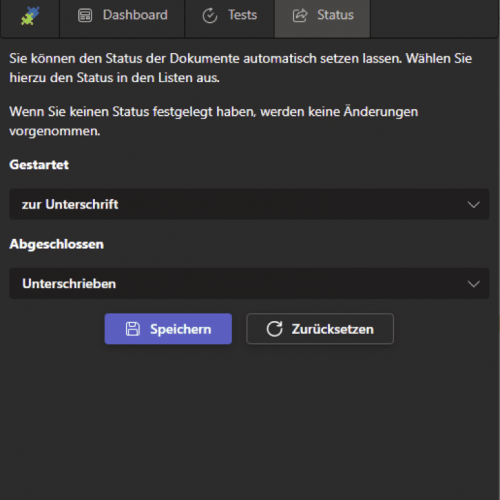
The statuses can then be set in the tegolyDATEV Connector #

Go to “Status” in our connector and select the previously created status from the list for the two states of a document. Save your selection. Ready!

Status

You can delete the status at any time via the “Reset” button.

Hat Dir dieser Artikel geholfen?

  • Happy
  • Normal
  • Sad
tegolyDATEV Connector UpdateCan the tegolyDATEV Connector also transmit phone numbers?
Inhaltsverzeichnis
  • The statuses can then be set in the tegolyDATEV Connector
tegolySIGN

© 2026 tegolySIGN