Since tegolySIGN is a webapp, i.e. browser-based application, you can integrate it into your DATEV workstation. It could look like this.
Procedure
Please scroll down in the DATEV workplace on the left under “Our law firm”.
At the bottom you will find “Current Information”***.
Please click on the right mouse button in the area of the menu items. After that, the following menu appears:
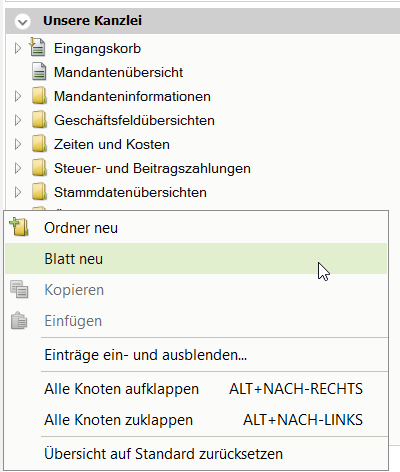
Click on “New sheet” and the following window will appear:
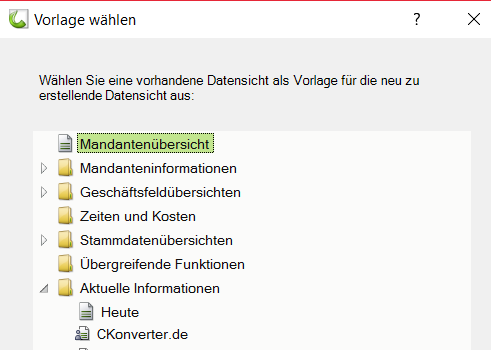
Now please set it to “Today” at the bottom and confirm with OK.
Now a new sheet is inserted under “current information” with the name “copy from today”. Please rename it to “tegolySIGN” by pressing the right mouse button and selecting the item “rename”.
Double-click on this sheet and then close all windows specified by DATEV in the window by clicking on the X in the upper right corner.
Then click on “+Insert content” and select “internet – Browser”.
Make windows big. Now you will see the browser with the DATEV page.
Then click on the wrench in the upper right corner, “Settings to the browser”
and copy this web address into it: signature.tegoly.com .
If you click on the wrench in the upper right corner again, you can also display the navigation.
Finally, please click on the tab with the name “tegolySIGN” at the top and open the menu with the right mouse button. Now please tick “Select this worksheet at startup”.
If you do not see “current information” in your overview, please open the menu with the right mouse button in the “our law firm” area and display the item via “Show and hide entries”.