In order for the tegolyDATEV Connector to work securely and smoothly, it must be updated from time to time. Please look at the version number in the dashboard below, then go to the appropriate section of your version.
Version 1.0.0 or later #
For version 1.0.0 or higher, the update must be done manually. Just follow the step-by-step instructions:
- Write down all configuration data, e.g. DATEV Link, API Key, Satus or simply take screenshots.
- Download the latest version of the connector: tegolyDATEV Connector
- Uninstall the old connector
- Install the new connector
- Restore the configuration
- Test if everything works, via tab “Test“
Version 2.0.0 or higher #
As of version 2.0.0, the connector has an integrated update function. To do this, follow these steps:
- Go to “Check Update“
- If there is a new version, it can be loaded and installed in the pop-up window
- Test if everything works, via tab “Test“
Version 3.0.0 or higher #
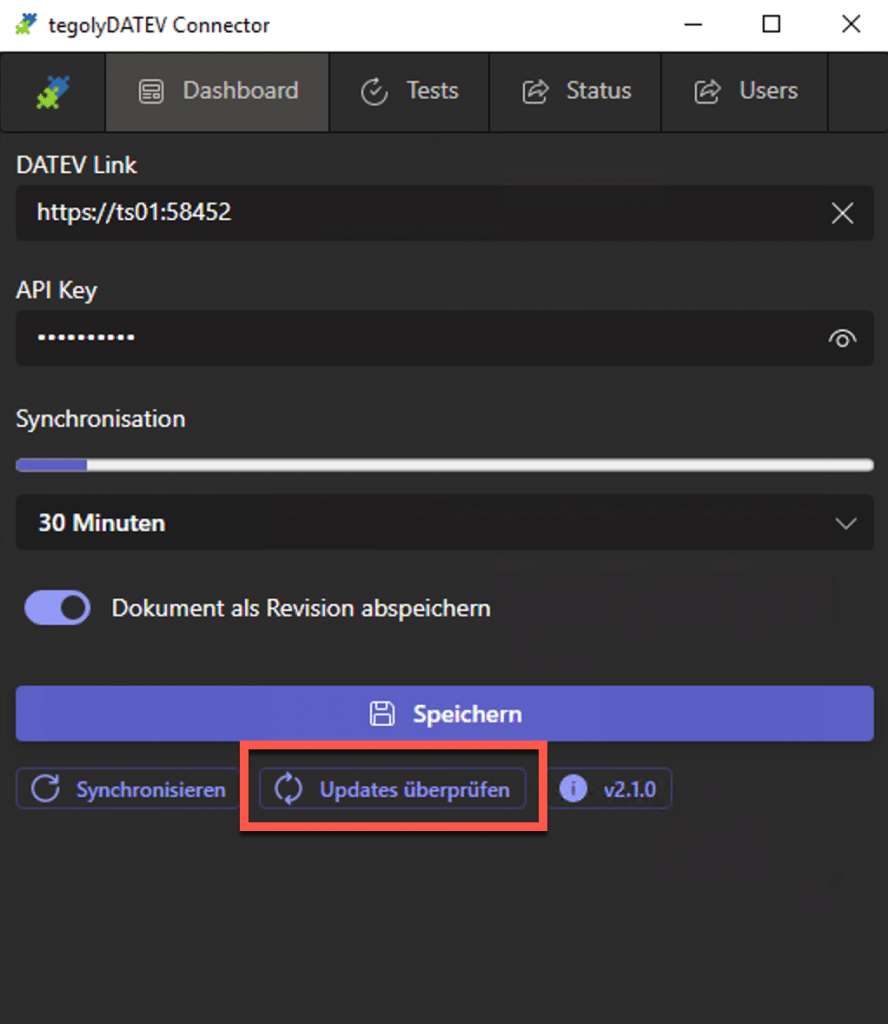
From version 3.0.0 you will find the update function as marked in the picture. To update, follow these steps:
- Go to “Check Update“
- If there is a new version, it can be loaded and installed in the pop-up window
- Test if everything works, via tab “Test“
- Repeat the steps for all installations on the terminal servers.
