Skip to content
tegolySIGN
Home tegoly Support German

Introduction

2
  • What is tegolySIGN
  • tegolySIGN Roadmap

First steps

4
  • Installation of the TEAMS APP
  • Grant access
  • How to get started with a trial subscription
  • How do I log in to tegolySIGN

tegolyDATEV Connector Installation

7
  • Installation tegolyDATEV Connector
  • Configuring the tegolyDATEV Connector
  • Terminal server
  • Multiple Terminal Servers
  • Desktop
  • Buy and set up DATEVconnect
  • Buy and set up DATEVconnect document management

Signing with tegolySIGN

16
  • How to prepare documents for signature
  • The Enterprise Version
  • Add contacts to the document
  • 2-factor authentication in the Enterprise version
  • Order
  • Maturity
  • Ready
  • Stamp
  • Favorites
  • Forms
  • Signing with QES
  • Authenticate for QES
  • Sign with Verimi eID
  • MultiSign
  • Signature link
  • Forwarding Signature Operations

Signing documents

4
  • Open a document
  • Signing a document
  • Reject
  • Save

Statistics

1
  • Statistics on your documents

Documents

4
  • List of all documents
  • Sort documents
  • Document Filters
  • Process documents

Administration

10
  • Statistics
  • Assign users with tegolySIGN’s Teams app
  • Assign Administrators
  • Subscription Management
  • Features in the Enterprise Version
  • General settings
  • DATEV
  • Assign users in the tegolySIGN WebApp (not MS Teams)
  • tegolySIGN Portal
  • Group function

FastSIGN

3
  • FastSIGN
  • FastSIGN
  • FastSIGN

Binder

1
  • The tegoly binder

General information on the digital signature

2
  • The eSignature
  • Your review helps us a lot!

DATEV-DMS

8
  • Preconditions
  • Document(s) from DATEV handed over for signature
  • Installation and setup
  • How does my signed document get back in DATEV-DMS
  • tegolySIGN Connector – Configure DATEV status
  • Transfer e-mail addresses from the client
  • tegolyDATEV Connector Update
  • Start tegolySIGN in DATEV

Power Automate Connector

2
  • A workflow example
  • What is Microsoft Power Automate

Templates

3
  • Create Templates
  • Send Templates
  • Edit templates

Trial period

1
  • Onboarding

DATEV Installation

6
  • Installation tegolyDATEV Connector
  • Configuring the tegolyDATEV Connector
  • Terminal server
  • Multiple Terminal Servers
  • Desktop
  • How do I log in to tegolySIGN

tegolySIGN Portal

1
  • The tegolySIGN Portal
  • Home
  • Docs
  • tegolySIGN
  • FastSIGN
  • FastSIGN
View Categories

FastSIGN

With FastSIGN, the processing of signature processes is much faster, as there is no need to set the signature fields, a sequence and a deadline. Thus, FastSIGN enables quick and easy creation and dispatch of the processes.

Specifically, the signature is displayed on an extra page at the end of the document. All other functionalities are retained.
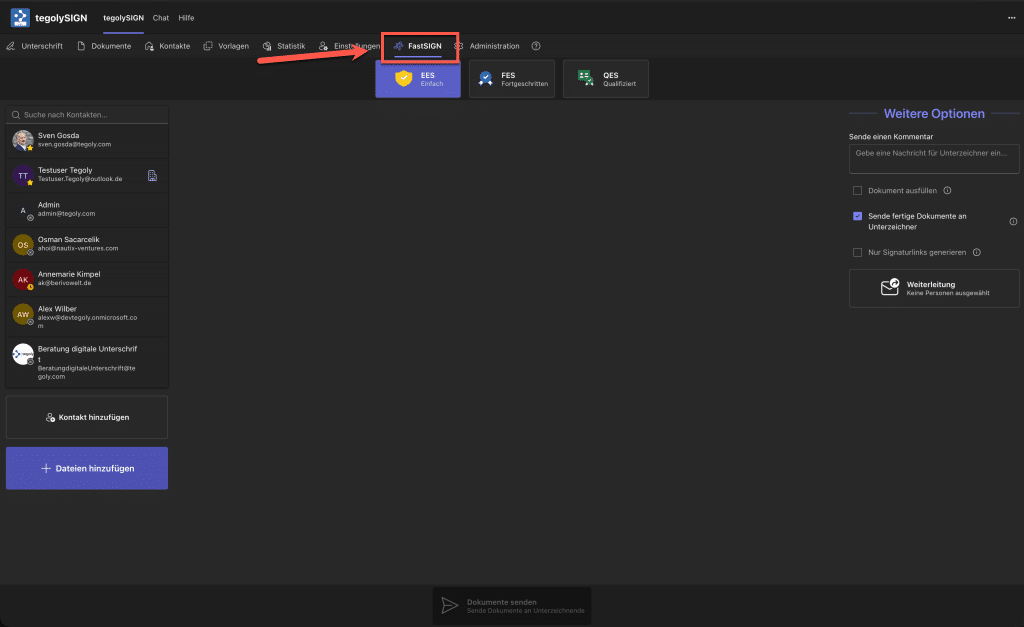
Using FastSIGN #

In this video, we show you how to use FastSIGN. It’s very simple:

  1. Select document(s)
  2. Select signers
  3. Select signature level
  4. Optional: Select “More options”
  5. Send
Hat Dir dieser Artikel geholfen?
Inhaltsverzeichnis
  • Using FastSIGN
tegolySIGN

© 2026 tegolySIGN